



User Manual
Diagrams
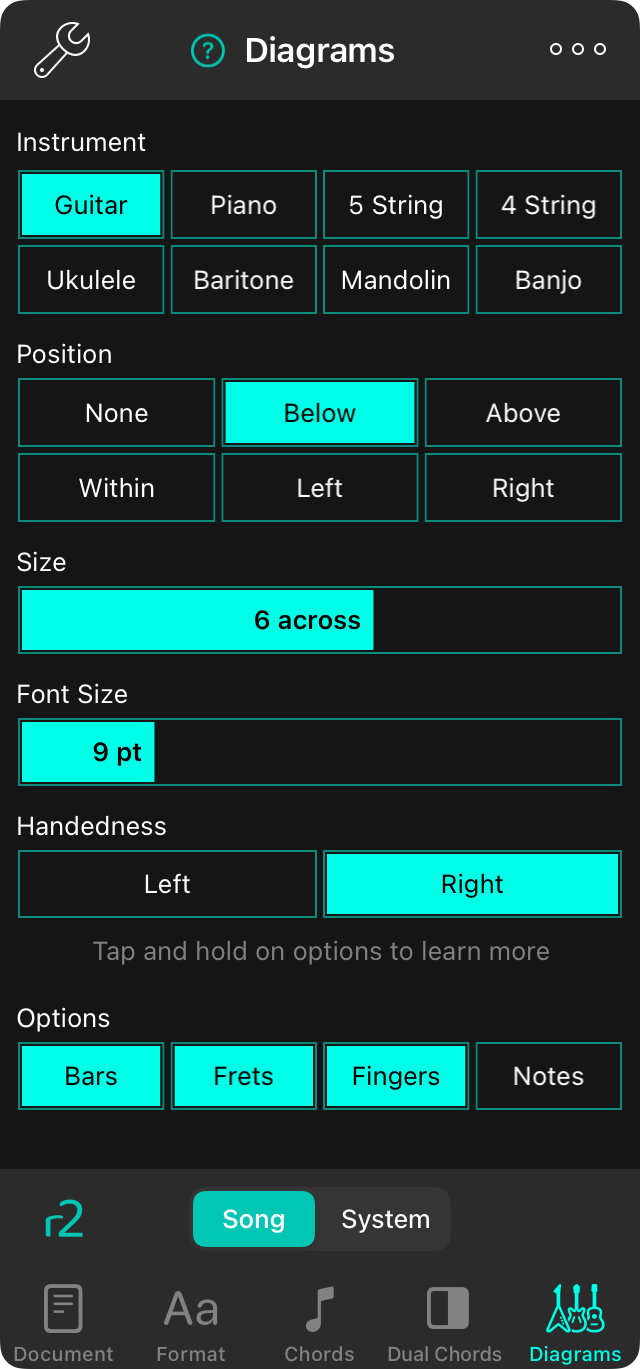
The diagram tab lets you configure how diagrams appear on your chord chart using the following settings.
Instrument
Choose an instrument to use for playing this song to determine what diagrams to draw. Options include: Guitar (Default), Piano, 5 String bass, 4 String bass, Ukulele, Baritone ukulele, Mandolin and Banjo.
Position
This determines where the diagrams are drawn in the chord chart.
- None does not draw the diagrams. Default.
- Below draws diagrams at the bottom of the song on the last page.
- Above draws diagrams between the title and metadata and the first section.
- Within draws diagrams within the lyrics replacing the space where letter/number chords would normally go. The chord formatting is also applied to the diagram in this case.
- Left draws diagrams vertically on the left edge of the chord chart. R2 Only.
- Right draws diagrams vertically on the right edge of the chord chart. R2 Only.
Size
The size of the diagrams. This is expressed by the number of diagrams that will fit across the content area of the virtual page and ranges between 4 and 10 diagrams across. Default is 6.
Font Size
This allows you to adjust the relative font size of the chord text displayed within the diagram. This is based on the size of the font relative to the document when the chord diagram is drawn 6 across.
Handedness
This determines which hand the musician is using to play the diagram. Default is right, but choosing Left will flip the diagram to make sense on left-handed instrument.
Options
You can set other options to change how the diagrams are drawn including:
- Bars will consolidate multiple fingerings on the first common fret as a "bar" that uses one finger to depress multiple strings. Default is on.
- Frets will display the fret numbers on the left side of the diagram. Default is on.
- Fingers will display the finger to use for playing the chord on the bottom of the diagram. This can be toggled with Notes. Default is on.
- Notes will display the note that is being played at the bottom of the diagram. This is mutually exclusive with Fingers. Default is off.



