



User Manual
Document Layout
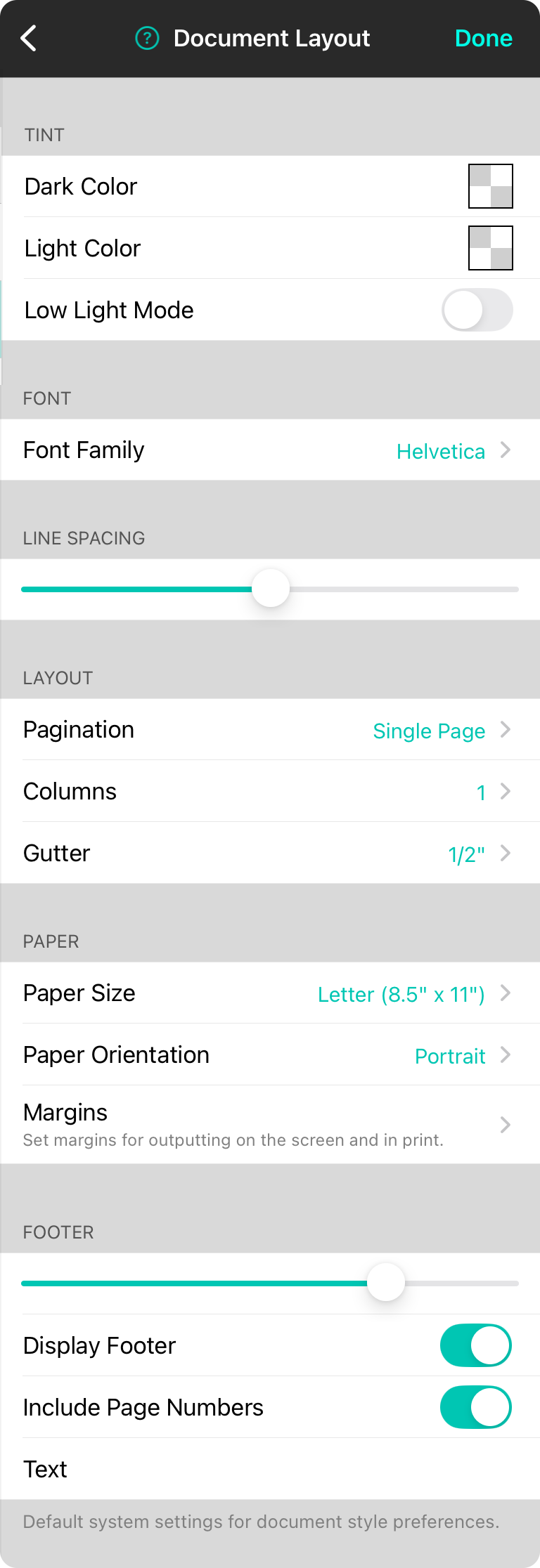
These settings define how text-based charts are laid out on the virtual page.
Tint
The tint is used as a translucent overlay to otherwise black and white text. This can be used to tint colors for those with visual stress disorders to improve reading or to reduce eye strain.
Dark Color
This color will be blended with any black "ink" on the page to colorize it. Default is transparent.
Light Color
This color will be blended with any white color on the page to colorize it. Default it transparent.
Low Light Mode
Determines if low light mode is enabled on the document. Default is off.
Font
This is the default font to use for new charts.
Font Family
You can select between common fonts including: Georgia, Helvetica (Default), Courier, and Marker.
Line Spacing
This allows you to adjust the distance between lines of text. The range that can be selected is 0.7 to 1.3. Default is 1.0.
Layout
This section determines how text is arranged on the page. Options include:
Pagination
This determines if text-based documents should be broken into the physical paper size or expand to be on a single, scrollable page. Options include: Single Page (default) and Multiple Pages.
Columns
This setting allows you to determine the default number of columns. Choose between 1 (Default) and 2 columns.
Gutter
This is the width of the whitespace to place between columns when there is more than one. Default is 1/2" and options include measurements from None to 1" in 1/8" increments.
Paper
This section defines the default sheet of virtual paper used to determine the size of elements as well as printing. Options include:
Paper Size
This lets you choose the size of the paper to draw the chart. Options include: Letter (8.5" x 11"), Folio (8.5" x 13"), Legal (8.5" x 14"), Tabloid (11" x 17"), A5 (148mm x 210mm), A4 (210mm x 297mm), or A3 (297mm x 420mm). Default is Letter.
Paper Orientation
This is the orientation of the paper used to render the song. Options include: Portrait (Default) or Landscape.
Margins
This lets you choose the default margins for the paper. This is between 0" and 1-1/2" in 1/8" or 1/4" increments. Default is 3/4".
Footer
This sections dictates how the footer of the song appears by default.
Footer Size
This slider allows you to determine the relative font size of the footer compared to the lyric size of the chart. This can be between 0-100%. Default is 75%.
Display Footer
This switch determines if the footer is outputted.
Include Page Numbers
This determines if page numbers are outputted in the footer.
Text
This allow you to add additional text to the footer.



