



User Manual
iPadOS/iOS Settings
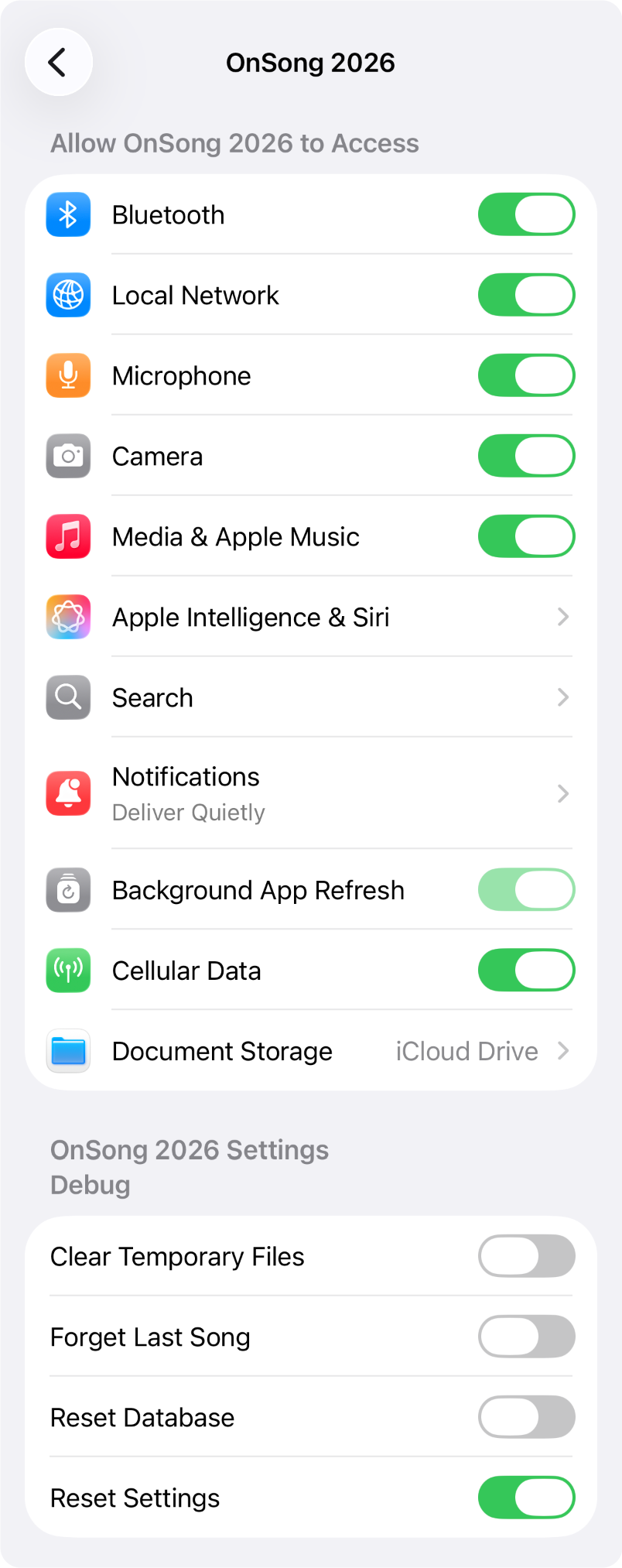
Apps can have settings that are only accessible through the Settings app on your device. This contains switches for changing permissions that you may have granted or declined. It also contains settings that are available to all users for troubleshooting issues. Here's what settings are currently available in the Settings app of iOS/iPadOS:
Access
This section is automatically set with prompts that appear in the app when specific resources are requested. You can change the settings here after the initial prompt is displayed.
- Bluetooth determines if the OnSong® app can access Bluetooth devices like wireless foot pedals.
- Local Network determines if the OnSong® app can use the local network. This is used by OnSong Connect and OnSong Console.
- Microphone determines if the built-in microphone can be accessed. This is used by various features of the OnSong® app like Voice Control, Tempo Detection, and the Key Finder.
- Camera determines if the OnSong® app can access the device's cameras. This is used by Live Video backgrounds for lyrics projection and the Document Scanner.
- Media & Apple Music determines if then OnSong® app can access your Apple Music media library for backing tracks.
- Apple Intelligence & Siri allows Siri to learn how you use the OnSong® app.
- Search allows you to customize search settings that integrate your content into Spotlight search.
- Notifications gives the OnSong® app permission to send push notifications and. how those are delivered.
- Background App Refresh determines if the OnSong® app can retrieve content from services in the background.
- Cellular Data allows you to define if the OnSong® app should use cellular data when WiFi is not available.
- Document Storage lets you choose how data in OnSong is stored.
Debug
This section contains switches that can be enabled for troubleshooting issues in OnSong.
- Clear Temporary Files will force any temporary files that are created to be flushed when the app is next loaded.
- Forget Last Song can be used if a song caused OnSong to shut down. Since songs are remember, this can cause issues opening OnSong again. Turn this on to clear OnSong's knowledge of what song it should automatically load.
- Reset Database will cause the database to be backed up to file sharing and then purged. This can be handy if there are issues loading the OnSong® app and you need to send your library to support staff for diagnosis.
- Reset Settings will clear all settings in OnSong and reload the user interface when you open the app.
OnSong 2026 — Last Updated on December 17, 2025



