



User Manual
Typography
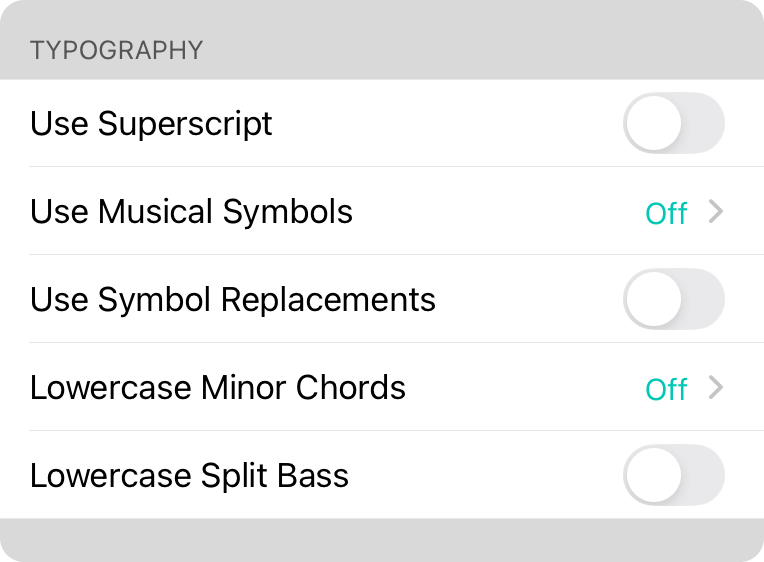
This section lets you change how type is treated for various attributes of the chord.
Use Superscript
Enabling this will make everything beyond the letter/number of the chord in superscript font style. Default is off.
Use Musical Symbols
This will convert the character typically used to include flat and sharp, and convert them to symbols and vice versa. Options include:
- Off means no changes are made to characters used to include sharps and flats.
- Text versions of sharp and flat symbols are used such as the lowercase b and pound/hashtag sign #.
- Symbols symbols found in music notation will be used for sharps ♯ and flats ♭.
- Localized versions of flat and sharp symbols are used for the active language.
Use Symbol Replacements
When this option is enabled, common symbols are used to replace common chord voicing. For instance, an "m" indicating a minor chord becomes "-". The following replacements are made:
- minor becomes -
- diminished becomes º
- augmented becomes +
- major seventh becomes †
- major becomes M
Lowercase Minor Chords
OnSong denotes minor chords with a lowercase "m" to the right of the uppercase chord letter and option enharmonic symbol. This settings gives you different options for using lowercase to indicate minor chords.
- Off is the default so minor chords display as an uppercase chord with a lowercase "m" like "Bbm".
- Note Only will remove the "m" and the chord letter is lowercased. For instance, "Gm" becomes "g".
- Full Chord will lowercase the chord and keep the "m". For instance, "Gm" becomes "gm".
Lowercase Split Bass
Split bass notes are separated from chords using a forward slash. Some cultures prefer this to be expressed as a lowercase letter. Toggle this setting on to lowercase the bass note. Default is off.



