



User Manual
Dual Chords
Dual chords allow you to have two different styles of chords present on the same sheet. For instance, you could display both the transposed chords as well as the original all at one glance.
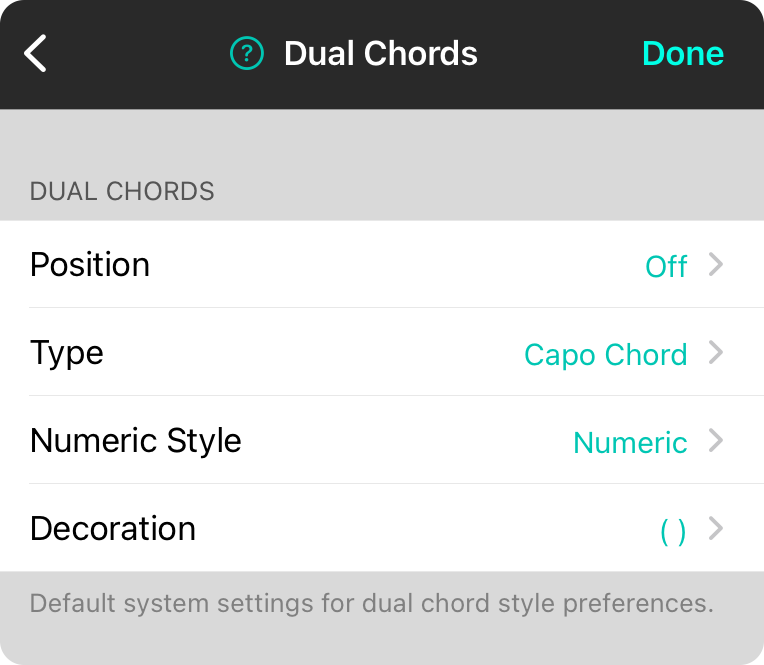
Position
This determines if the secondary chord is enabled, and if so, where it appears in relation with the other chord.
- Off disables the dual chord output. Default.
- First will display the secondary chord before the primary chord.
- Last will display the secondary chord after the primary chord.
Type
This determines what is displayed for the secondary chord.
- Capo Chord is the chord modulated by the specified capo.
- Original Chord is the chord played in the original key.
- Transposed Chord is the chord as transposed by the specified key.
- Numeric Chord is the numeric version of the chord.
Numeric Style
If you choose to view a numeric chord for the secondary, you can choose which type of number system to use including:
- Nashville displays chords as numbers (1-7) based on their position in the key.
- Roman displays chords as Roman numerals (I, ii, iii, IV, V, vi, vii) based on their position in the key.
- Solfege displays chords as numbers using Latin (do, re, mi, fa, so, la, ti) based on their position in the key. This normally stays constant and does not change when you transpose keys unless you change the Solfege Type setting.
Decoration
Determines if the secondary chord should be enclosed with text such as:
- None (default)
- Square Brackets [ ]
- Parentheses ( )
- Angle Brackets < >
- Curly Braces { }
OnSong 2026 — Last Updated on December 16, 2025



